Deliver client-ready PCAs faster, in your firm’s format

From site visit to final report, every deficiency is entered once and carried through your narrative, cost tables, and photos.

Get a demo
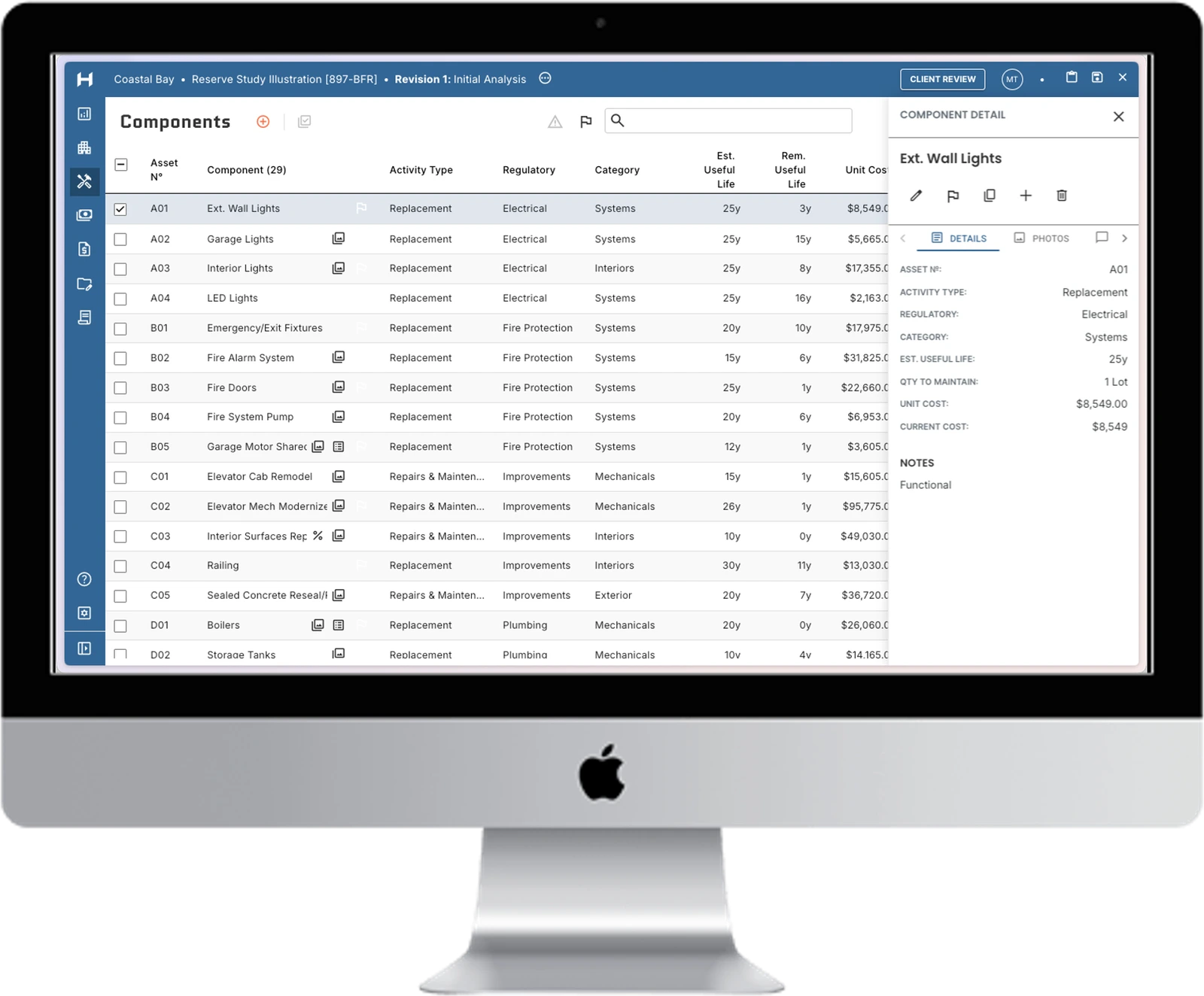
HomeRun IQ assessment workspace showing property deficiencies, component details, and costs
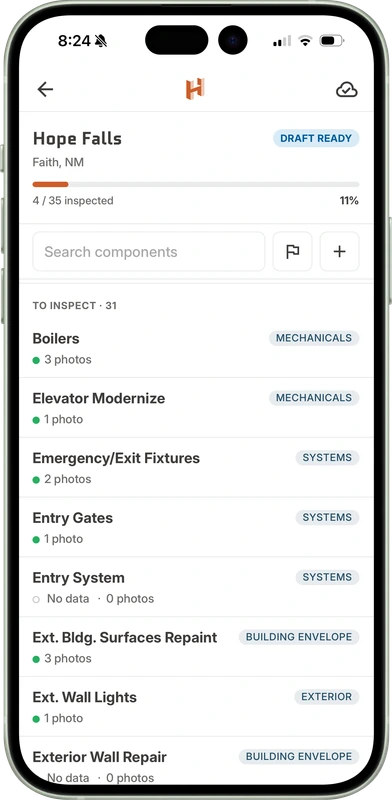
HomeRun IQ mobile field app for documenting property deficiencies and inspection progress

Why PCAs take longer than they should

Whether you call it a PCA, a property condition report , or a building condition assessment, the client’s deadline rarely moves, and most of your time goes into writing the report. The same building data gets typed into the narrative, the tables, and the cost table, then corrected in each one when something changes. And clients often want the cost table early, before the full report is done.

How a PCA comes together in HomeRun IQ

HomeRun IQ is property condition assessment software for engineers and consultants, built around the property’s deficiencies. You enter each deficiency once, and it flows through your narrative, cost tables, and photos. So you’re not chasing every change across your report or locked into how your information is shared.

Before your first assessment, our team sets up your branded report templates and deficiency library with you, so your assessments follow your firm’s standards from day one.

  1. Step 1

    Start your assessment

    Begin at the office on your desktop, or in the field with the mobile app. Select the assessment type, enter basic property details, and pull in deficiency lists by property type from your firm’s library, so each building starts from what you already know.

  2. Step 2

    Capture deficiencies

    Take annotated photos and record observations for each deficiency on site in the mobile app, even with no signal. Or bulk upload camera photos after the visit and match them to deficiencies at your desk. Then choose the ones for the report and keep the rest for reference.

  3. Step 3

    Rate conditions and assign actions

    Record each deficiency’s condition, recommended action, and priority, from immediate repairs to longer-term replacements. Pull descriptions from your firm’s language library, then adjust them to what you found on site. Complete ADA, Fair Housing Act, and building materials checklists alongside your findings.

  4. Step 4

    Build cost tables

    Pull useful life and costs from your firm’s library and set remaining life based on what you found on site. You can build your cost tables for any term your client requires, with inflation applied. If your client needs numbers early, share a draft before the report is done.

  5. Step 5

    Generate the report

    Select your firm’s report template, and the narrative, tables, and photos pre-populate from everything you’ve entered, with photos placed in each section or in a photo log. Refine the parts that call for your judgment, without reformatting or copying and pasting.

  6. Step 6

    Deliver and revise

    Share the report as a PDF or online with clients, owners, and lenders, marked as a draft until it’s final, or review it with them live. When changes come in, edit once and every table and section follows.

Deficiency-based vs. report-writing PCA software

Conventional report-writing tools organize a PCA by report section, so the same building information is entered, and corrected, section by section. HomeRun IQ organizes it by deficiency, so each one is entered once and every section draws from it.

Scroll horizontally to compare all approaches

HomeRun IQWord & ExcelOther PCA software
How building data is entered Once per deficiency, shared across your report Separately in each document and spreadsheet Section by section, duplicated across the report
Field photos and notes Tied to deficiencies on site, or bulk uploaded and mapped at your desk Sorted, captioned, and retyped at your desk Synced into report sections, then sorted
Conditions and actions Recorded once per deficiency, with your firm’s language library Typed paragraph by paragraph Selected line by line, often hundreds of times per report
Cost tables Built from deficiency data for any term, with a draft available anytime Built by hand in separate spreadsheets Entered apart from the narrative, so the two can drift
Report format Your existing template, replicated and easy to update Fully flexible, fully manual Vendor-built templates that are hard to change without the vendor’s help
When a figure changes Change it once; narrative, tables, and cost table follow Update it in every file Update it in every section it appears

PCA requirements by standard, lender, and purpose

Every PCA is written to someone’s requirements: the ASTM standard, a lender’s format, or an investor’s questions, or the needs of a legal case. Here’s what each one typically asks for as of 2026, and how HomeRun IQ handles it.

What is ASTM E2018, and what changed in E2018-24?

ASTM E2018 is the standard guide for property condition assessments of commercial real estate. It sets the baseline process for the walk-through survey, document review, and opinions of cost. E2018-24, the current version, made more than 140 revisions to E2018-15. Among them:

  • It redefined immediate repairs around physical deficiencies that require prompt action, such as life-safety issues.
  • It formally defined long-term costs as capital replacements above $3,000, or a threshold the client sets.
  • It encourages consultants to match the long-term cost term to the client’s planned hold period.

In HomeRun IQ, cost thresholds, terms, and priority categories are set in your template, so each report is set up for the standard and the scope your client agreed to, without rebuilding tables by hand.

What do Fannie Mae, Freddie Mac, and HUD require in a PCA?

Agency lenders set their own report formats and cost table terms. Fannie Mae and Freddie Mac multifamily PCAs project replacement reserves for the loan term plus two years, up to 12 years. HUD requires a 20-year capital needs assessment (CNA), submitted through its CNA e-Tool, for FHA multifamily mortgage insurance applications.

HomeRun IQ sets up a template for each lender, so the same deficiency data produces the right tables for whichever lender the deal is going to.

How does an equity PCA differ from a lender PCA?

A lender PCA protects the loan. It follows the lender’s format and focuses on immediate repairs and reserves over the loan term. An equity PCA serves a buyer or investor. It often looks further ahead, matches costs to the planned hold period, and may cover upgrades the buyer is weighing. Agreeing on scope and term up front, as E2018-24 encourages, keeps an equity PCA from growing mid-deal.

Because HomeRun IQ builds cost tables from deficiency data for any term, you can run the lender’s term and the buyer’s hold period from the same site visit.

How does a litigation-support PCA differ?

A litigation-support PCA documents a property’s conditions for a legal dispute, such as a construction defect claim. It often calls for more detailed documentation of each deficiency, and the report is prepared for attorneys rather than a lender, in the format they need.

In HomeRun IQ, the fieldwork doesn’t change. A separate template produces the report each case requires.

See how HomeRun IQ handles your PCAs

Loading form...